Archives: Moteus

New product day: moteus heat spreader

The moteus controller is capable of a lot of instantaneous power. However, to fully make use of that power, you’ll need to keep the mosfets cool on the board. moteus has two mechanisms for that:

  1. A heatsink can be mounted to the bottom side of the PCB between the board and the motor. This is most useful when integrated into a servo motor, and the servo housing can be used as a heatsink.
  2. Mounted to the top of the board, attaching to the MOSFETS directly.

In addition to the MOSFETs, the gate driver chip, the DRV8323 can produce large amounts of heat, especially when the controller is run at a higher voltage, like the 44V that the moteus r4.5 supports.

moteus and socketcan

Various users have been trying to use lower-cost Raspberry Pi CAN-FD adapters for the moteus controller for some time (like this one from Seeed), but have had problems getting communication to work. I buckled down and went to debug the problem, discovering that the root of the issue was that the linux kernel socketcan subsystem calculates very sub-optimal CAN timings for the 5Mbps bitrate that moteus uses. This results in the adapters being unable to receive frames sent at the actual 5Mbps rate, but instead only slightly slower.

Automated wire stripper and cutter

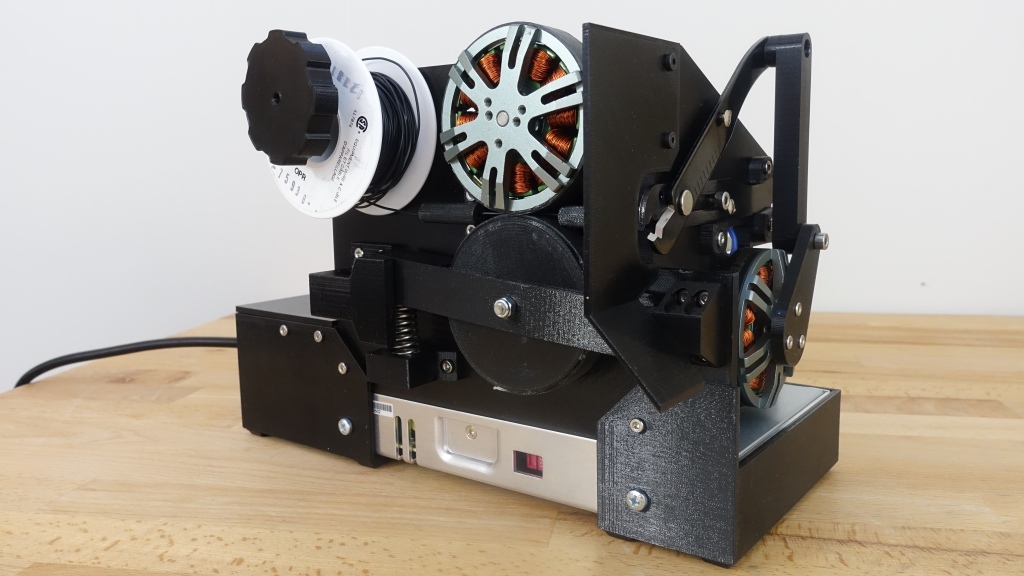
Over the Thanksgiving day holiday, I knew I had a bunch of harnesses to build. Rather than being a good corporate steward and actually building them, I instead built a machine to automate the first of the 3 time consuming parts of the harness construction: wire cutting and stripping.

This was just thrown together from two cosmetically damaged moteus devkits, a Raspberry Pi 3 an old development version of a pi3hat, a hand wire stripper, two synthetic rubber bands, an off the shelf 24V supply, and a bunch of 3d printed parts.

pip3 install moteus

NOTE 2025-10-29: An updated version of this post can now be found in the official moteus documentation:


I’m excited to announce new python bindings for communicating with moteus controllers! A simple example from the README:

import asyncio
import math
import moteus

async def main():
  c = moteus.Controller()
  print(await c.set_position(position=math.nan, query=True))
  await asyncio.sleep(1.0)

asyncio.run(main())

This code will try to locate an fdcanusb on your host and use it to communicate with controller with ID 1. All of those details can be customized through code depending upon how you construct things. The library is pure python, although it doesn’t work on Windows currently because it relies on an asyncio aware pyserial wrapper that doesn’t work there.

Native moteus tools for Windows

To date, all of the development tools for the moteus brushless controller have been available exclusively for Linux based operating systems. I’ve been doing some behind the scenes work, and have gotten to the point where moteus_tool now runs natively on windows and can communicate with moteus controllers using a fdcanusb.

Check out the Windows installer for the latest release:

To make this work, I started from the excellent grailbio/bazel-toolchain, which provides LLVM toolchains for Linux based systems based on the official LLVM pre-compiled binaries. I forked that into mjbots/bazel-toolchain and added Windows support. It isn’t perfect, because the LLVM project only distributes Windows binaries in installer form, and it isn’t possible to extract binaries from them without specialized tooling. So, this version relies on a manually re-packed compressed archive of all the executables.

moteus r4.5

Meet the newest revision of the moteus controller!

Yes, it does look mostly the same as the r4.3 that has been getting a lot of use lately. This revision exists mostly to improve manufacturability, but I snuck in a minor design improvement while at it. Now, the maximum voltage input is rated up to 44V from the 34V of the r4.3! (Note though, that the pi3hat and power_dist still are limited to 34V). Otherwise the new controller is fully electrically, mechanically, and software compatible with the r4.3.

New compilation commands for moteus

To stay on top of bazel development, and to prepare for some future improvements, I’ve gone ahead and upgraded the moteus firmware build system, rules_mbed to use the new bazel “platforms” toolchain resolution mechanism.

Previously, rules_mbed used the “crosstool_top” bazel mechanism for toolchain configuration. This allowed a single package to contribute a set of C++ toolchains which would be selected based on CPU and compiler. One of the downsides from the rules_mbed perspective, is that it made it difficult to make a build that included both mbed targets and host targets (or anything else non-mbed). rules_mbed worked around this by including a functioning clang host toolchain within it.

rules_wix - bazel MSI support

As part of some experimentation in native Windows tools for moteus, I’ve created a dirt simple rules_wix repository in github. It provides a minimal wrapper around the WiX Toolset for creating Window’s installers from within bazel. There’s nothing fancy there yet, but it can at least make an installer with a single executable in it!

Unlimited rotations for moteus

The moteus controller has always supported multiple turns when counting positions. It has a one-revolution magnetic encoder built in, but after turn on, it keeps track of how many turns have occurred. However, if you’ve followed previous moteus tutorials, you have probably noticed a persistent caveat that for accurate control, the position of the output shaft needs to stay within a hundred revolutions of 0.0 or so. Now, I’ll describe why that was, and what I’ve done to remove the limitation, allowing unlimited rotations!