Archives: Features

Space vector pulse width modulation (SVPWM) for moteus

A permanent magnet motor controller like moteus has to, at the end of the day, apply voltages to the phase wires of a motor in order to induce currents. Those currents generate magnetic fields that push against permanent magnets in the rotor to make the motor move. I’ve looked at parts of this process before, see “Compensating for FET turn-on time”, but in this post we’ll look at an additional technique that can extend the effective modulation depth, thus increasing the maximum speed that a motor can be driven.
PWM output with moteus

Here’s a bit more in-depth discussion of a yet another new feature from moteus firmware release 2024-10-29: pulse width modulated output on auxiliary ports.

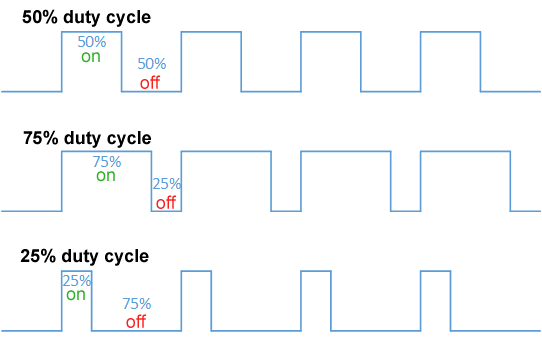
A pulse width modulated signal is a logic level signal of a fixed frequency, where the duty cycle, or width of the pulse, is changed or modulated to communicate a scalar value. Obligatory Wikipedia diagram below:

The new feature does what it claims to do, in that a subset of auxiliary pins can now be configured to output a PWM signal. If so configured, the duty cycle can be controlled using either the diagnostic or register protocol.

moteus configurable motor thermistors

When operating a moteus controller with a brushless motor there are two main things that can get hot: the FETs (field effect transistors) on moteus and the motor itself. By default, moteus has built in thermal throttling and fault detection if the FET temperature exceeds rated limits. In many configurations, the motor can be thermally connected to the moteus controller, so that the same FET temperature sensing can be used to prevent damage to the motor, but that isn’t always the case.

Electrical power reporting with moteus

TLDR: As of firmware release 2024-05-20 moteus can now report a pretty good estimate of the electrical (and thus mechanical) output power going to the motor. You can get that through all the language binding options or in tview!

Background

Brushless motor controllers like moteus act like step down DC/DC converters. Their input is a higher voltage and low current, while the output to the motor is low voltage and higher current. If working properly, the output current is driven so as to produce torque at the output shaft.

Wait for trajectory completion in tview

As of pypi 0.3.68, tview has gained the ability to delay execution of a compound command until the currently executing trajectory is complete. This can be useful for developing more complex motions that consist of multiple steps.

To use it, just issue a '?[optional_id]' in your command sequence. For instance, to move to position 1 and come to a stop, then move to position 0 when that has completed, you could do:

moteus + Arduino

NOTE 2025-10-29: An updated version of this post can now be found in the official moteus documentation:


The moteus line of brushless motor controllers currently require a CAN-FD host to send commands in order to actually execute a motion profile. moteus has long provided a python library that can be used on desktop operating systems to send commands and parse responses, and recently added a C++ one as well. Next up, and described in this post, is a library for Arduino which provides the ability to command and monitor brushless motors using moteus motor controllers.

recapturing position and velocity with moteus

Recently I covered a new feature for the moteus brushless controller that improved robustness for velocity control when external torques exceed the maximum allowable control torque. In this post, I’ll cover a feature that can be used for a similar situation in position control, “recapturing position and velocity”.

In some applications, while in position mode, it can make sense to limit the maximum torque during specific periods so that external torques are able to overpower the controller. The most obvious case would be if the maximum torque is set to 0, or the kp and kd scale are set to 0 temporarily. A problem then arises when resuming control, as the “control position” will be wherever it last was, despite the fact that the actual motor have have been dragged by the external torque some distance away. When the torque limit is released, a large transient can develop as the controller tries to instantaneously get back to the old control position.

max_velocity_slip with moteus

The moteus brushless motor controller supports several concepts of operation from within its primary “position” mode, including a velocity mode. As documented in the reference, you can run in that scenario using commands equivalent to the diagnostic mode command:

d pos nan V nan

Where V is the desired velocity. However, as with most control operations, there are a number of edge cases that can be useful to handle. When operating purely in velocity mode, the normal PID constants can be interpreted slightly differently:

moteus_tool --restore-config

For the moteus brushless controller, the moteus_tool utility has long had a --dump-config command line action which will cause the entire contents of the configuration to be written to standard output.

--dump-config format

This configuration looks like this:

servo.pid_position.kp 4
servo.pid_position.kd 0.1

moteus_tool has also had a --write-config option, which is something of a misnomer, as it actually just sends any commands one at a time from a file to the controller. Notably, it requires that the file to contain actual valid diagnostic mode commands.

moteus with velocity=NaN

When commanding a moteus controller, many of the registers defined in the reference documentation give explicit semantics when the value is passed as either a floating point NaN value or the “maximally negative integer” for integer encodings. Those that do not specify a meaning for NaN are “undefined” and anything can happen. For the most part, this isn’t a problem, but in one specific case users were repeatedly caught off guard.

Three common registers often set in position mode, (also accessible by the unlabeled first three arguments to “d pos”), are 0x020 “target position”, 0x021 “target velocity”, and 0x025 “maximum torque”. Target position has a defined meaning when set to NaN: the controller assumes that the target position is the current target position, or the sampled position if the controller is not yet in position mode. Maximum torque also has a defined meaning when set to NaN: it then uses the maximum torque as defined by the maximum phase current limit. However, target velocity had no such definition, and in practice when used, resulted in the controller becoming mostly non-functional.