Archives: Development

Updated serialization library (diagnostics part 1)

Now that I have the qdd100 servo in beta phase, the IMU working at full rate, and the quad A1 is moving around I’m getting closer to actually working to improve the gaits that the machine can execute.  To date, the gaits I have used completely ignore the IMU and only use the feedback from the joints in order to maintain force in 3D.  With tuning and on controlled surfaces this can work well, but if you go outside the happy regime, then it can undergo significant pitch and roll movements during the leg swing phase, which at best results in a janky walk, and at worst results in oscillation or outright instability.

Multiple axes in implot

I used Dear Imgui for the simple Mech Warfare control application I built earlier and was relatively impressed with the conciseness with which one could develop effective (although not necessarily the prettiest), interactive and response user interfaces in C++.  For some time I had been planning on developing a new diagnostic application for the mjbots quad that would allow plotting like the original tplot.py, but would also integrate recorded video and 3D rendering and diagnostics.  I had assumed I would use HTML/JS because it is the cool new thing, but I never got up the energy to make it happen, because every technical step along the way had big hurdles.  I figured I would give Dear Imgui a try, but the big thing it was missing was plotting support.

More MLCC learning

It seems that I’m learning much about PCB design the very hard way.  Back last year I wrote up my discovery of MLCC bias derating.  Now I’ll share some of my experiences with MLCC cracking on the first production moteus controllers.

When I was first putting the production moteus controllers through their test and programming sequence, I observed a failure mode that I had yet to have observe in my career (which admittedly doesn’t include much board manufacturing).  When applying voltage, I got a spark and puff of magic smoke from near one of the DC link capacitors on the left hand side.  In the first batch of 40 I programmed, a full 20% failed in this way, some at 24V, and a few more at a 38V test.  I initially thought the problem might have been an etching issue resulting in voltage breakdown between a via and an internal ground plane, but after examining the results under the microscope and conferring with MacroFab determined the most likely cause was cracking of the MLCCs during PCB depanelization.

Quad feet construction fixture

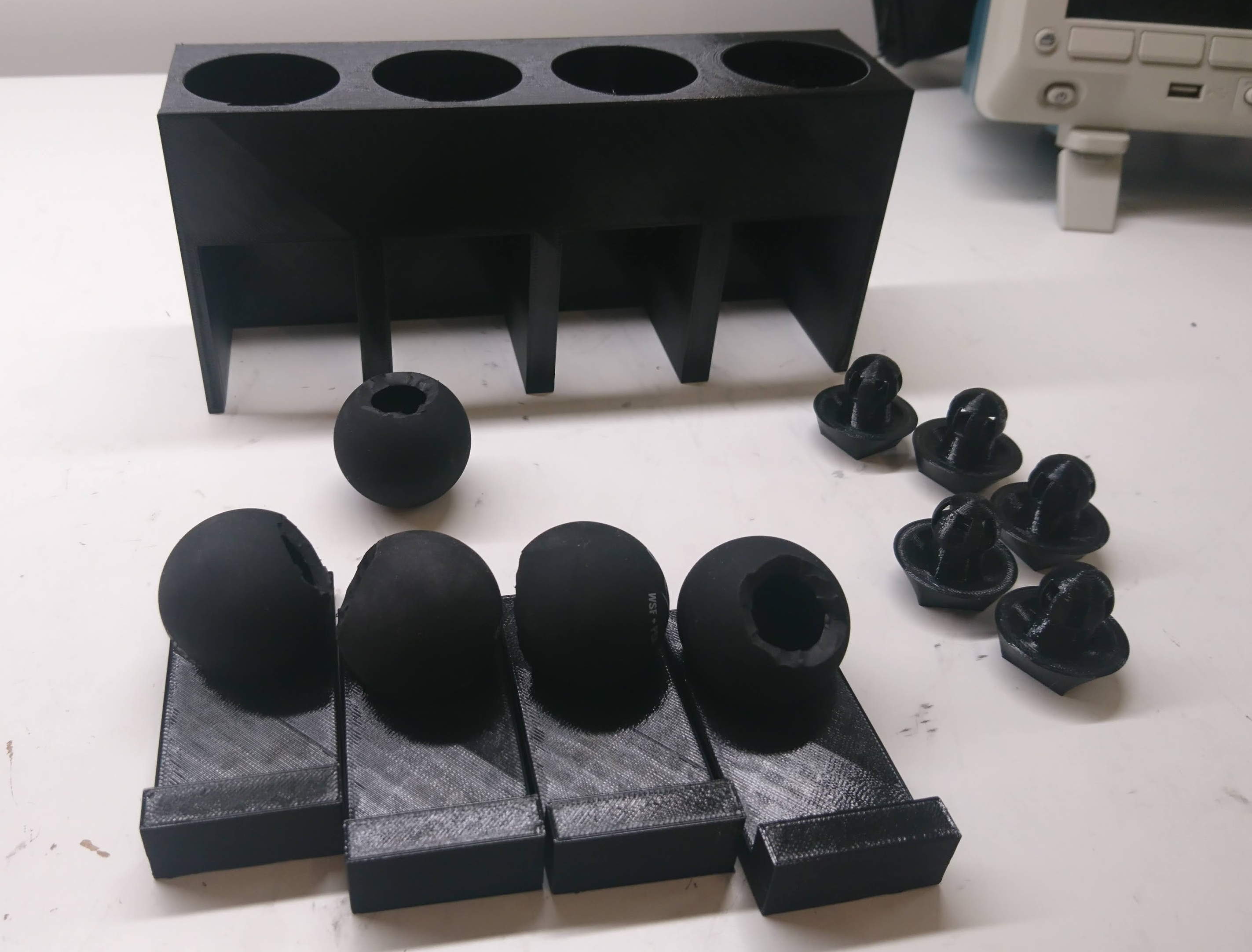
The quad A1 was the first robot I built with foam cast feet.  When I did the first feet, I jury rigged a fixture from some old toilet paper rolls to hold things in place while they were curing.  When I went to rebuild with my most recent leg geometry, I figured it was time to get at least a little more serious.  Thus, my new leg casting fixture:

dsc_0578

When an insert is cast into place, it is set on one of the trays, the tray is inserted into a slot, and then a weight can be placed on top and constrained by the fixture.

Primitive turret automatic tracking

Continuing in my series of developments with the Mech Warfare turret, I’ve now managed to replicate the primitive target tracking functionality I had in the v2 version of the turret.  This works using a pretty simple principle:

  • raspicam is used to read the raspberry pi camera
  • ArUco is used to find any fiducials in view
  • The target closest to the center is deemed, the “active target”
  • The pitch and yaw rate are set based on a simple P controller to bring that target to a known point

This works passably, as shown in the video below:

quad A1 chassis updates

I finally got around to fixing a number of minor glitches in the quad A1’s chassis recently.

1. The raspberry pi is now far enough away from the left panel that you can connect the HDMI if you choose.

20200506-rpi_mounting

2. I no longer have vestigal studs for the pre quad A0 junction board on the other side.

20200506-power_dist

3. The switch got moved down to between the legs.

dsc_0631

Leg zeroing fixture

As part of provisioning a quad A1, or anytime the mechanical configuration has been changed, I need to go and record where the zero position of all the joints is.  The “0” position for the software now is with the shoulders perfectly horizontal, and the upper and lower leg sticking straight down.

Up until now, every time I’ve done this it has just been by eyeballing and with lots of foam and bubble wrap to shim things into place long enough to record the level.  Sometimes I had to go back and try a few times, as even determining when something is straight is not, well, straightforward.

Programming and testing moteus controllers

Like with the fdcanusb, I built a programming and test fixture for the moteus controllers.  The basic setup is similar to the fdcanusb.  I have a raspberry pi with a touchscreen connected via USB to a number of peripherals.  In this case, there is a STM32 programmer, a fdcanusb, and a label printer.  Here though, unlike with the fdcanusb fixture, I wanted to be able to test the drive stage of the controllers and the encoders too.

nrfusb multiple slave support

The Mech Warfare turret concept I’m developing involves having basically two independent robots, the actual robot and the turret.  To make that be controllable in a sane way, the control station will command and receive telemetry from both simultaneously, allowing control actions to be given in the camera frame of reference.  Otherwise, remote piloting is… very challenging.

This could be done just by having two separate transmitters.  Since the nrfusb that I’m using is spread spectrum, many transmitters can easily co-exist at the same time.  However, the protocol is designed such that a single transmitter can simultaneously communicate with multiple slaves at the same time, simply by switching channels more frequently.

Turret active inertial stabilization

This post will be short, because it is just re-implementing the functionality I had in my turrets version 1 and 2, but this time using the raspberry pi as the master controller and two moteus controllers on each gimbal axis.

I have the raspberry pi running the primary control loop at 400Hz.  At each time step it reads the IMU from the pi3 hat, and reads the current state of each servo (although it doesn’t actually use the servo state at the moment).  It then runs a simple PID control loop on each axis, aiming to achieve a desired position and rate, which results in a torque command that is sent to each servo.  Here’s the video proof!