
New moteus documentation page
Yesterday I dropped a big update to the official moteus documentation that should hopefully improve it across many dimensions. If you’re impatient, go to the new URL and check it out:
Or read on here to get a feel for the things that have changed.
Technology
The most obvious initial change is the switch from “mostly a single Markdown” file to using mkdocs. I can’t claim that mkdocs is particularly new or shiny, but it is widely adopted and largely gets the job done while still letting the content largely be in Markdown format.
As a bonus, it still integrates trivially with GitHub and GitHub pages, so that the documentation is always up to date with the current HEAD of the moteus repository. Maybe in the future we’ll support hosting documentation for different versions of controller, but for now you get a single one.
Content
The technology aside, the biggest changes are in the content, notably the fact that (a) there is a lot more of it and (b) it is organized in a way that someone other myself has at least a non-zero chance of finding what they may be looking for!
Organization
The new structure has 5 top level categories
- Introduction - What is says on the tin, including a “quick start” guide that provides a quick checklist for the two common ways of getting started, “bare board” and “devkit”.
- Using moteus - All the information needed to install and use a moteus controller or devit, in the correct order you need it in.
- Integration - How to use each of the client libraries, and notes on how to make moteus work with different embedded platforms like Raspberry Pi, NVidia Jetson, and Arduino.
- Troubleshooting - Common troubleshooting paths
- Reference - Everything else
In addition, each of the categories is broken down into reasonable “chapters” and “sections” each of which can be seen in the traditional mkdocs material them left and right and side navigation bars.
Compared to the “giant” file approach most people will have a much easier time of accomplishing their goals without necessarily resorting to Discord or email. For those that do ask, I now have more and better URLs to hand out!
Worked encoder examples
For the two most common non-standard encoder configurations there are now explicit walkthroughs. That would be:
-
Hall Effects: Despite the fact that they are a not terribly performant encoder solution, lots of applications still want to use hall effects. Getting them working required more effort to put together information from several sources. Now it is hopefully all in one place.
-
Dual Encoders: This shows how to use an external MA600 for disambiguation in a two encoder setup, which is commonly what you want when you have a reasonably low backlash gear reducer.
Graphical pinout diagrams
For each of the active moteus controllers, there are now graphical pinout diagrams that make it much more clear which order pins are in and what capabilities the AUX port pins have. For example, here is the moteus-c1 diagram:
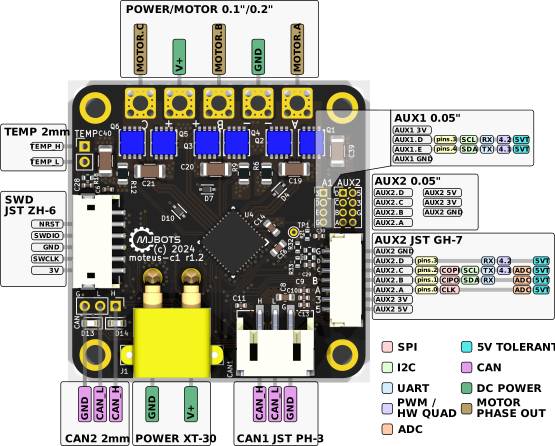
It has several useful features:
- Pin ordering overlayed on board render: So that you can’t get the orientation wrong, the pins for each connector are labeled directly on a render of the board (or a render of the PCB for the older moteus boards).
- AUX capabilities are included: Basically the full contents of the aux port capabilities table is now included in each diagram, color coded. That way you can easily see which pins are capable of I2C, UART, etc.
- Connector types and positions are documented: Especially for the board mount pads, the exact spacing required going to the CAD to determine previously. Now all that information is located right alongside the pinout.
The pinouts were also made in Inkscape, so are pretty easy to update if new information ever needs to be included.
Troubleshooting guides
Previously, since I didn’t have a great place to put troubleshooting guides, they rarely got written. In fact, the only one was this blog post for troubleshooting calibration. The contents of that have now been pulled into the documentation, as well as new guides that cover:
- Calibration: Largely the contents of the above blog post
- Lack of Motion: you need to check the mode and fault
- Limited Torque: you most likely have too small a controller or motor, but maybe some cooling will do
- Gate Driver Faults: you either (a) asked moteus to do too much (b) have too small a power supply or (c) the board is electrically damaged
Even more
Here are just some of the other pieces of new material included in the new docs:
- Library integration guides: Canonical documentation now exists on how to use the python library, C++ library, and how to test manually generating CAN frames.
- Platform guides: Similarly, in addition to socketcan and Raspberry Pi material which was present before, the official documentation now includes NVIDIA Jetson and Arduino material.
- Python API reference: It is only auto-generated, but people seem to have an aversion to looking at source code these days.
Next steps
Hopefully, with the improved structure it will be easier to keep this maintained, add new content and for everyone to find what they are looking for. Happy building!